

sum aggregation type and
amount defined as the event property -
learn more).
You can define several parameters for the percentage charge model, including:
- Percentage rate: charge rate that applies to the total amount (e.g. 1.2% on transactions);
- Fixed fee (optional): fee that applies to each event ingested during the billing period (e.g. $0.10 per transaction);
- Free units (per event - optional): number of events that are not subject to the fixed fee;
- Free units (total amount - optional): amount that is not subject to the charge rate;
- Per-transaction spending minimum (per event - optional): sets the minimum amount of spending required for each individual transaction; and
- Per-transaction spending maximum (per event - optional): sets the maximum amount that can be charged for each individual transaction.
Premium feature ✨: only users with a premium license can define a per-transaction spending minimum and maximum for the percentage pricing model.
Please contact us to get access to Lago Cloud and Lago Self-Hosted Premium.
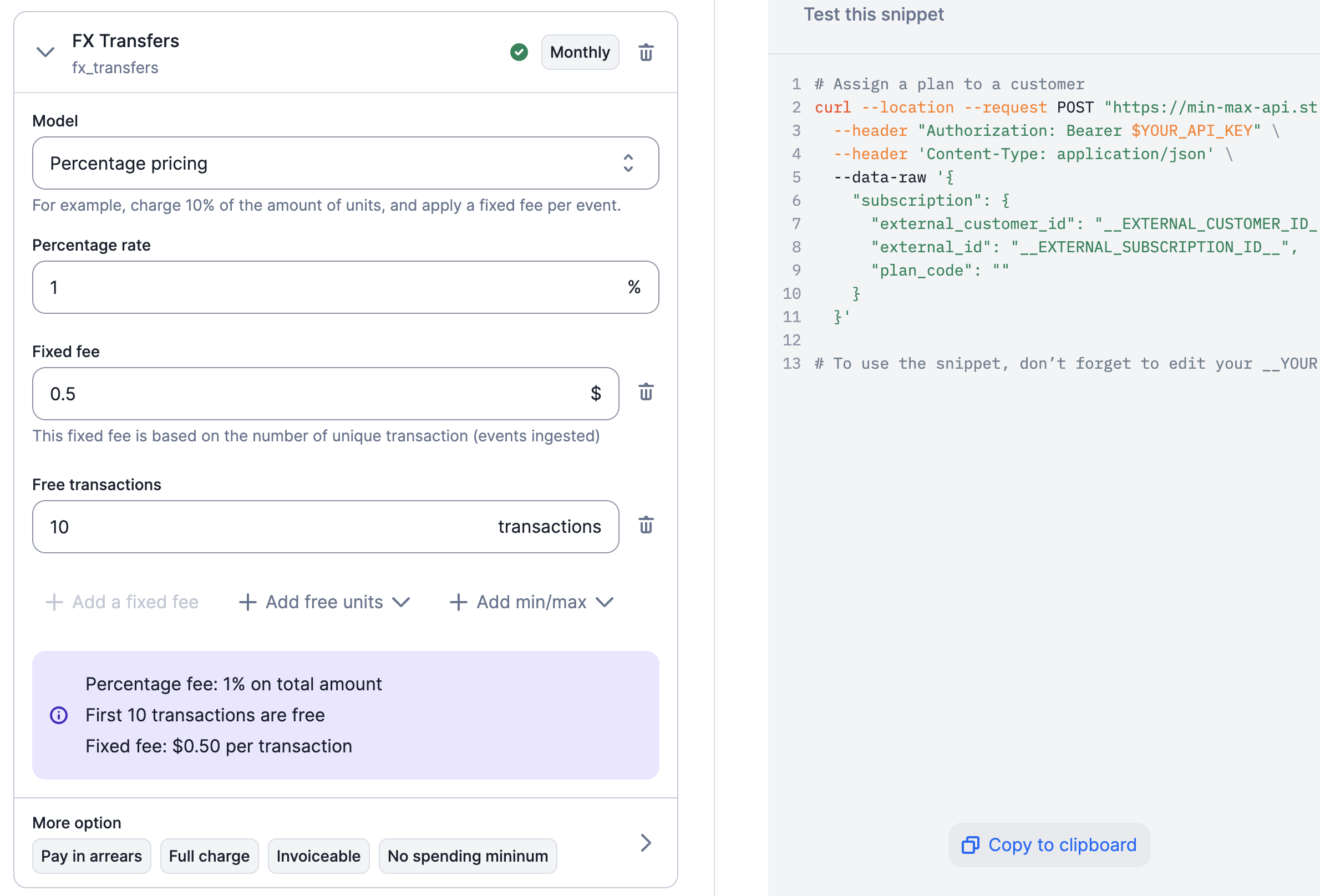
Configuration of the percentage charge model
Therefore, for the fourth transaction, the charge will be $0.10 x 1 event + 1.2%
of $50 = $0.70.